irys.uploadFolder()
Permanently uploads a folder.
Parameters
folderToUpload: Path to the folder being uploadedindexFile: (optional) The name of an index file also included in the folder you upload. If provided, this index file will load when a user requestshttps://arweave.net/[manifest_id]batchSize: (optional) The number of files to upload at once.keepDeleted: (optional) Whether to keep now deleted items from previous uploads. When you upload a folder, the file names are indexed and saved. If you then re-upload that same folder, Irys will only upload new files added since the previous upload. In the case where you delete files from your source directory, this flag tells Irys whether to keep those deleted files in the index or remove them.
Returns
receipt: A JSON object with the following values
response = {
	id, // Transaction id (used to download the data)
	timestamp, // Timestamp (UNIX milliseconds) of when the transaction was created and verified
	version, // The version of this JSON file, currently 1.0.0
	public, // Public key of the bundler node used
	signature, // A signed deep hash of the JSON receipt
	deadlineHeight, // The block number by which the transaction must be finalized on Arweave
	block, // Deprecated
	validatorSignatures, // Reserved for future use once we're decentralized
	verify, // An async function used to verify the receipt at any time
}
const irys = await getIrys();
// Upload an entire folder
const folderToUpload = "./my-images/"; // Path to folder
try {
const response = await irys.uploadFolder("./" + folderToUpload, {
indexFile: "", // optional index file (file the user will load when accessing the manifest)
batchSize: 50, //number of items to upload at once
keepDeleted: false, // whether to keep now deleted items from previous uploads
}); //returns the manifest ID
console.log(`Files uploaded. Manifest ID ${response.id}`);
} catch (e) {
console.log("Error uploading file ", e);
}Files uploaded via irys.uploadFolder(folderToUpload) can be retrieved in one of two ways.
- Creating an URL with the format
https://arweave.net/[manifest-id]/[original-file-name]. - Creating an URL using the transaction ID of each individual file uploaded with the format
https://arweave.net/[transacton-id]
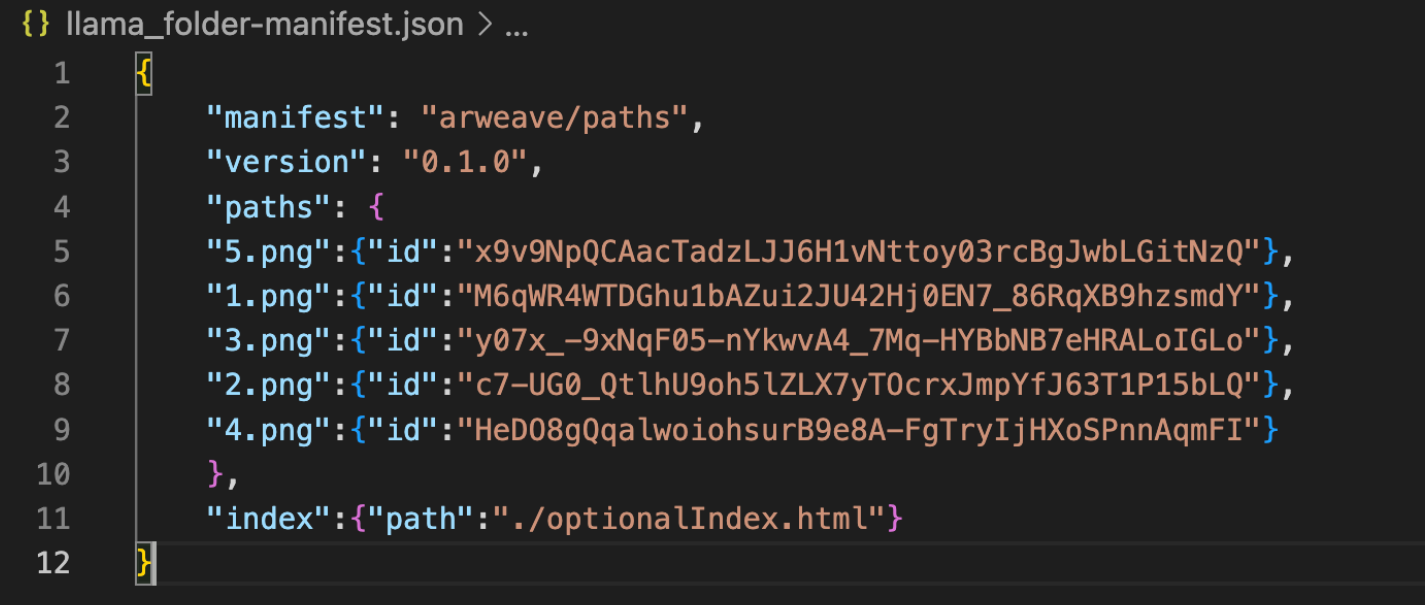
After a successful folder upload, two files are written to your local project directory [folder_name].csv and [folder_name].json. The example below highlights a folder called “llama_folder” with a total of 5 files in it. The transaction id for each file can be used to retrieve the uploaded data by forming an URL with the format https://arweave.net]/[transaction-id]